

Follow the competition as scores are entered, with live standings throughout the round. Sample scores are fictional.
Plan events, organise players, publish tee times, enter scores and follow results — all in one place for organisers and members.
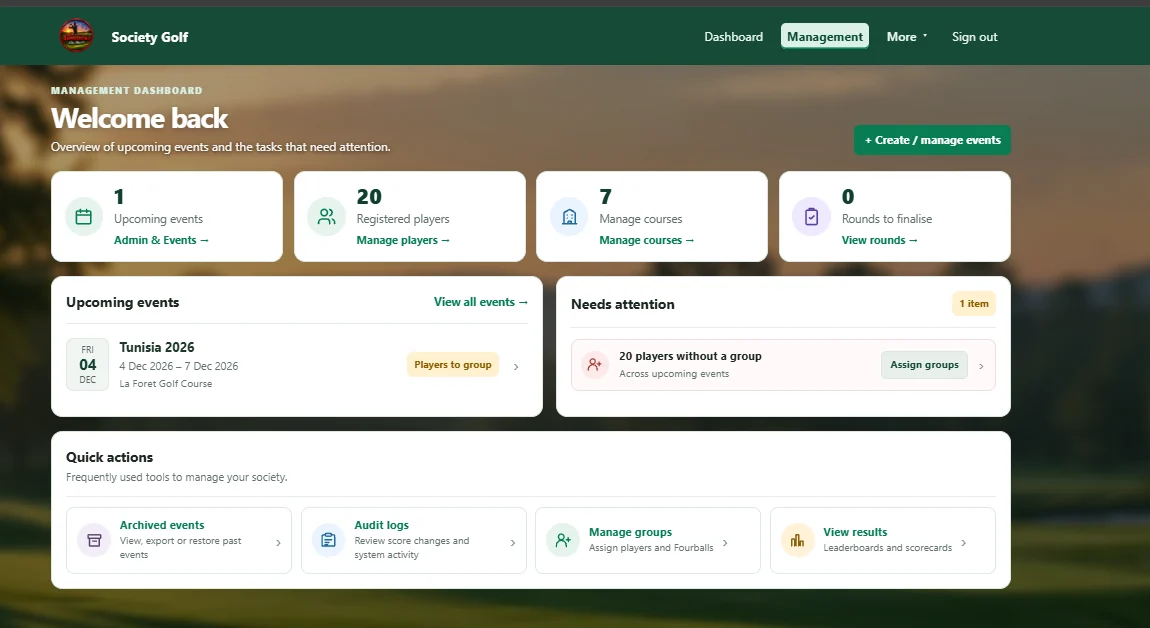
Select a feature to see a genuine application screen, with an explanation of what you can do. The tee sheet and leaderboard examples use fictional data.
See upcoming events, registered players, course information and jobs that need attention as soon as you sign in.
A complete, easy-to-use platform for society golf — from event setup to live results, handicap calculations and member records.
Follow the competition as scores are entered, with live standings throughout the round. Sample scores are fictional.

Calculate Course and Playing Handicaps from each golfer’s Handicap Index, tee ratings and selected round allowance.
Create single or multi-round events, each with its own format, course and tees.
Assign players to groups, build tee sheets and publish playing arrangements.
Record hole-by-hole scores on your phone, with offline scoring for regular rounds.
Export event reports, keep past results and maintain the Roll of Honour.
Keep players informed about tee times, scoring and event changes.
A complete record for each member, including results, Handicap Index, scores and past events.
Run a society event with live leaderboards and automatic Course and Playing Handicap calculations in a few straightforward steps.
Choose the format, course, tees and competition details.
Create groups and publish the tee sheet to players.
Players record scores and the live leaderboard updates.
Results are confirmed and retained. Course and Playing Handicaps are calculated for each round.
Specific answers about running events, calculating handicaps, mobile scoring and keeping members informed.
Yes. Create a single-day event or schedule several rounds on different dates and courses. Each round can have its own tees, scoring format and handicap allowance.
Society Golf calculates a Course Handicap using a player’s Handicap Index and the selected tee ratings, then applies the round’s chosen allowance to determine the Playing Handicap. Organisers can make recorded individual adjustments when necessary.
No. It calculates Course and Playing Handicaps for society competitions; it does not automatically update the player’s external Handicap Index. Optional between-round Stableford deductions affect the next round only.
Yes. As scores are entered, players can follow the live standings. Society Golf supports round-by-round results, overall rankings across compatible rounds and dedicated Match Play leaderboards.
Society Golf supports Individual Stableford, Gross and Net Stroke Play, Singles and Four-Ball Match Play, and Texas Scramble. Eligible rounds can also have an Eclectic leaderboard.
For regular Stableford and Stroke Play rounds, scores can be saved on the device while offline and synchronised after reconnecting. Match Play score entry requires an internet connection.
Yes. Arrange golfers into groups of two, three or four, set starting times and scoring permissions, and publish the tee sheet when it is ready.
Organisers can publish personalised playing arrangements and send in-app notices. Compatible devices can also receive optional phone push notifications, including updates to published tee times or groupings.
Yes. You can set tees and allowances per round, including regular-round options of 85%, 90%, 95% and 100%. Course ratings, slope ratings and par are stored for each tee.
Yes. Maintain a course catalogue with tee sets, ratings, hole-by-hole par and stroke indexes, and optional photographs. Course information can also be imported from CSV files.
Yes. Completed events and results can be retained, with player score histories, exportable event reports and a Roll of Honour for historic winners.
Yes. Society Golf includes organiser and member permissions, scoring access controls and separate roles for people who belong to more than one society.